
Receipt scanner for iPhone, iPad & Android Every receipt.
Finally useful.

Scan receipts in seconds, organize every purchase, track expenses and warranties, then export the reports you need. Receiptly keeps it all together without making it complicated.

  • Free to download
  • iPhone, iPad & Android
  • No Receiptly account required
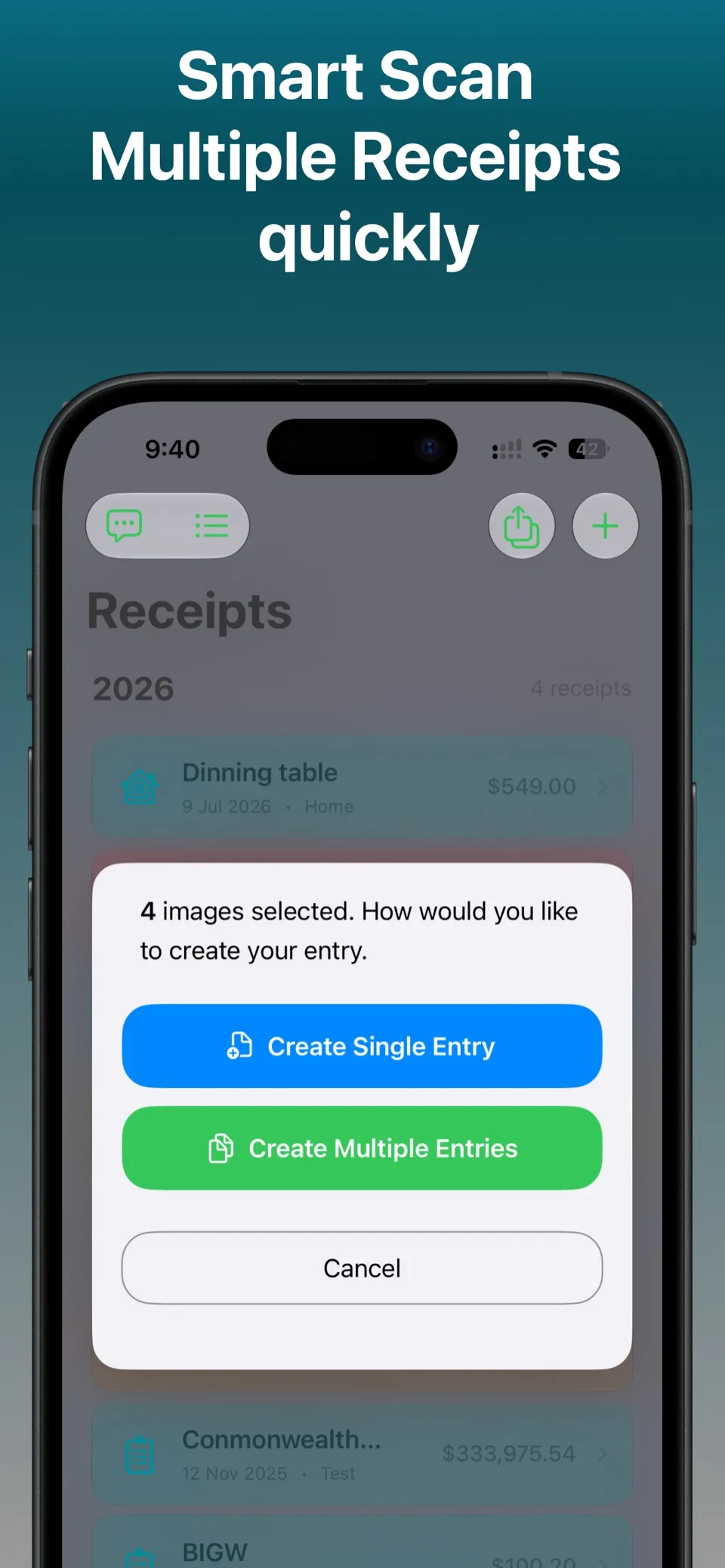
Receiptly batch receipt scanner creating multiple entries from four selected images
Smart Scan extracts the details
Batch capture saves the backlog
01Scan

Turn photos into organized receipt entries.

02Organize

Find purchases by merchant, category, tag, or product.

03Track

See spending, reimbursements, and warranties clearly.

04Export

Prepare PDF, CSV, or Excel files when needed.

Made for real-life receipts

A receipt organizer that does more than store a photo.

Receiptly connects the purchase to the things that matter afterwards: the expense, the reimbursement, the report, the warranty, and the moment you need to find it again.

Choose your platform

Receiptly for iOS and Android.

Scan receipts, organize purchases, track expenses and warranties, and export reports. Storage and integrations depend on your device.

Android

Keep your receipt library on your Android device, with no Receiptly account to create.

  • Scan with on-device text recognition from Google ML Kit.
  • Choose optional Smart Scan for extra help with receipt images using Google’s cloud AI services.
  • The Android app does not include Gmail import or sync with iPhone, iPad, or iCloud.

Smart Scan is optional on both platforms and can send a reduced receipt image to Google’s cloud AI services. Gmail imports on iOS use a separate, on-device process. Read about scanning and data use.

Smart receipt scanning

From camera roll to receipt record, quickly.

Use the camera, photos, or files to add receipts. Smart Scan helps pull out key information, while batch receipt scanning turns multiple images into separate entries in one pass.

  • Review extracted details before saving
  • Create one entry or a batch of separate receipts
  • Keep context with categories, tags, and products
Batch receipt scanning options in Receiptly on iPhone
Receiptly expense reports with spending charts and category analysis Receiptly expense tracker grouped by personal and business categories
One clear viewReceipts, expenses, income & reimbursements

Expense tracker & reports

Know where the money went—not just where the receipt is.

Group personal and business expenses, record credits and reimbursements, then see the bigger picture through daily, monthly, category, and custom reports.

DailyCalendar-level detail
FlexibleCustom report periods
VisualTrends and categories

Receipt and expense exports

Your records, ready to share.

Choose receipts or expenses, filter the date range, categories, and tags, then export a focused PDF, CSV, or Excel file for your own records or the people helping with them.

PDFCSVExcel

Export and full reports are available with Receiptly Pro on iOS and Receiptly Plus on Android. More about exporting.

Receiptly export screen with PDF, CSV and Excel options and filters

Receipt organizer

A place for every purchase. A way back to every detail.

Use custom categories, colors, icons, and tags to make Receiptly fit your life. Search by merchant or purchase details. On iPhone and iPad, keep records available across your Apple devices with optional iCloud sync. On Android, the library stays on that device and does not sync with iPhone.

CategoriesTagsSearchProductsiCloud on iOS
Custom receipt categories, tags, colors and icons in Receiptly Receiptly receipt organizer with optional iCloud sync on iPhone

Built for what happens next

The receipt is only the beginning.

02

Travel receipts

Choose a receipt currency, save an exchange rate, and report the value in your home currency later.

Multi-currency tracking
03

Receiptly Privacy Policy

Read the full policy for iOS, Android, and optional Gmail import, including what data the app accesses, how it is used and shared, how long it is kept, and how to disconnect or delete it.

Read the full privacy policy

Gmail receipt import

Turn purchase emails into receipts.

On iPhone and iPad, connect Gmail in Integrations and browse your recent purchases. Choose the ones you want, review the merchant, date, amount, and line items, then save each one as a receipt. You can also use a PDF or image attachment as the receipt.

  • Read-only access. Receiptly never changes or deletes your emails.
  • Email text and attachments are processed on your device, never sent to cloud AI.
  • Disconnect any time. Receipts you saved stay in your library.

Gmail import is included with Receiptly Pro on iPhone and iPad. It is not part of the Android app. How Gmail import works.

Receiptly Gmail integration on iPhone with Sign in with Google, for choosing purchase emails to save as receipts
Apple Shortcuts automation creating a Receiptly expense from a Wallet transaction

Apple Shortcuts automation

Let an expense create itself.

On iPhone, connect Receiptly to a Wallet transaction automation in Shortcuts so a payment can become an expense without typing the amount again.

Scan a receiptCreate an expenseFind receiptsCheck warranties

App Store reviews

Useful wins over complicated.

See Receiptly on the App Store
★★★★★
“Does what I need without being overcomplicated.”
John T 222 · App Store reviewer
★★★★★
“Will make end of tax year a breeze.”
MoonlightDrifter · App Store reviewer
★★★★★
“Saved me so much time instead of using spreadsheets.”
Davey Australia · App Store reviewer

Frequently asked questions

A little more detail, before you download.

Need help with something else? Read all FAQs or email support.

Is Receiptly on iPhone, iPad, and Android?

Yes. Download it on the App Store for iPhone and iPad, or on Google Play for Android.

Do iPhone and Android libraries sync?

No. The Android library does not sync with iPhone or iCloud. Each install keeps receipts on that device. On iPhone and iPad, optional iCloud sync can share a library across your Apple devices only.

What does Receiptly scan automatically?

On-device scanning extracts key receipt details so you can review and save the purchase without entering everything manually. Smart Scan is an optional extra pass for tricky receipts.

Can I scan multiple receipts at once?

Yes. Select multiple images or capture several receipt photos, then create separate receipt entries in one batch.

Can Receiptly track personal and business expenses?

Yes. Organize personal or business spending with categories and tags, and track expenses, income, credits, and reimbursements.

Which receipt and expense export formats are supported?

Receiptly can export receipt and expense information as PDF, CSV, or Excel files. Export is a Receiptly Pro feature on iOS and a Receiptly Plus feature on Android.

Can Receiptly remind me when a product warranty expires?

Yes. Add products to a receipt, record their warranty dates, and use reminders to stay ahead of upcoming expiries.

Does Receiptly support travel receipts in different currencies?

Yes. Keep a home currency, choose another currency for a receipt, and store its exchange rate for later reporting and reimbursement.

How does Receiptly handle my receipt data?

Receipt data is stored on your device. On iOS it can sync through your iCloud account if you enable that. The Android library does not sync with iPhone or iCloud. Smart Scan is optional and may send a reduced receipt image to Google AI services when enabled. Gmail content is not sent to cloud AI services. Read the full privacy policy.

How does Gmail receipt import work?

On iPhone and iPad, open More, then Integrations, then Gmail, and sign in with Google. Browse recent purchase emails, choose the ones you want, and review the details before saving each one as a receipt. Email text and attachments are processed temporarily on your device. The receipt fields you save and a marker for previously imported emails enter your library and can sync with iCloud. Gmail import is included with Receiptly Pro and is not available on Android. Read about Gmail privacy.

Is Receiptly free?

Receiptly is free to download. Optional Receiptly Pro purchases on iOS, and Receiptly Plus purchases on Android, unlock features such as Smart Scan, exports, and full reports, plus Gmail import on iPhone and iPad. On Android, adding receipts, reports, and export also require Plus. Android Plus may include a 3-day trial.

Receiptly app icon

Receiptly for iPhone, iPad & Android

Make the next receipt the last one you lose.

Scan it. Organize it. Find it when it matters.

Download on the App Store Get it on Google Play
Free to download · Optional in-app purchases